All projects

Simplot: Field to Screen

Take complex and antiquated agricultural systems and distill them down into a streamlined mobile and tablet experience with offline capabilities.

Year
2022
Client
Simplot
Category
Mobile UI/UX, Design Systems
Duration
14 weeks
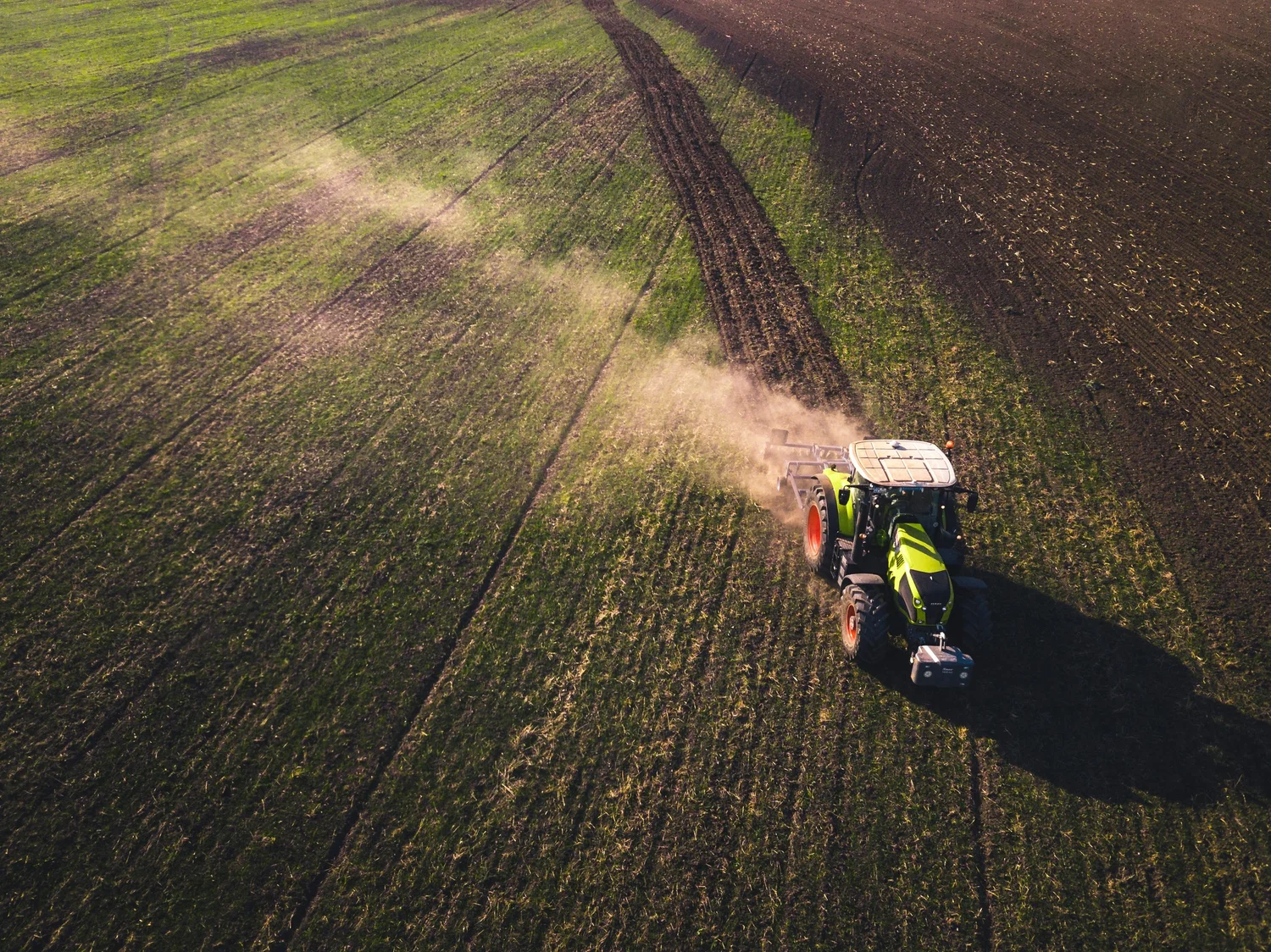
Aerial view of a tractor working agricultural fields at golden hour

Making agricultural data approachable

Simplot's field operators and growers relied on antiquated desktop tools to manage spatial data, crop scouting, and field-level actions. The existing systems were cluttered with inconsistent patterns, unclear hierarchy, and interfaces that assumed a desk and a large monitor. But the people using them were standing in fields, working under time pressure, often with spotty or no connectivity.

The core design challenge was balancing data density with clarity for a mobile-first product. Agricultural data is inherently complex: spatial coordinates, layered map data, crop types, pest observations, weather overlays, and farm associations all competing for screen real estate on a 6-inch display.

The goal: a powerful yet approachable product that enables confident navigation between overview and detail, designed for the conditions where it would actually be used.

14
Week engagement
14
Observation types
48hr
Rapid discovery sprints
100%
Offline capable

End-to-end product design

I led end-to-end user flows in Figma with an emphasis on reusable, scalable components. The work spanned discovery research, interaction design, visual design, and design system documentation. I worked directly with growers, field operators, and the engineering team to ensure every design decision held up under real field conditions.

A significant part of the role was systems thinking: building a component library that could accommodate the full complexity of agricultural data without creating technical debt. Every map interaction, filter panel, and detail overlay needed to be consistent enough to feel familiar but flexible enough to handle wildly different data types.
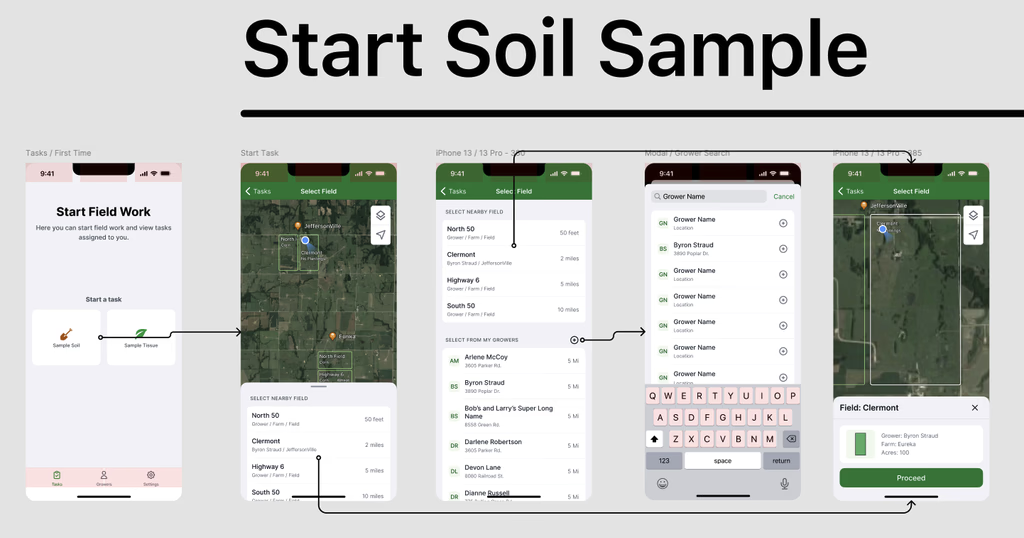
Soil sample workflow showing five connected screens: start field work, map selection, sample grid, field element details
End-to-end soil sampling flow: from field work initiation through map-based selection to sample grid and field element detail

Understanding the field

Step 01
Discovery research
Focused on grower and field operator spatial data navigation, time-sensitive field actions, and friction points in existing tools. Identified core issues: visual clutter, inconsistent interaction patterns, and unclear information hierarchy that slowed decision-making in the field.
Step 02
Strategic priorities
Established a map-first interaction model with layering and progressive disclosure. Defined the need for consistent, scalable system components and a purposeful mobile experience that wasn't just a reduced desktop. Identified clear entry points for search, filtering, and field-level actions.
Step 03
Mobile-first hierarchy
Every layout started at the smallest viewport. Primary actions were always accessible with one hand. Large tap targets, clear contrast ratios, and minimal interaction friction were non-negotiable. The mobile experience was designed as the primary product, not a responsive afterthought.
Step 04
Rapid 48-hour sprints
The mobile scouting feature went from discovery to implementation in 48-hour sprints, including custom illustrations and icons for 14 observation types plus a null state. Speed was essential because field conditions and crop cycles don't wait for design reviews.
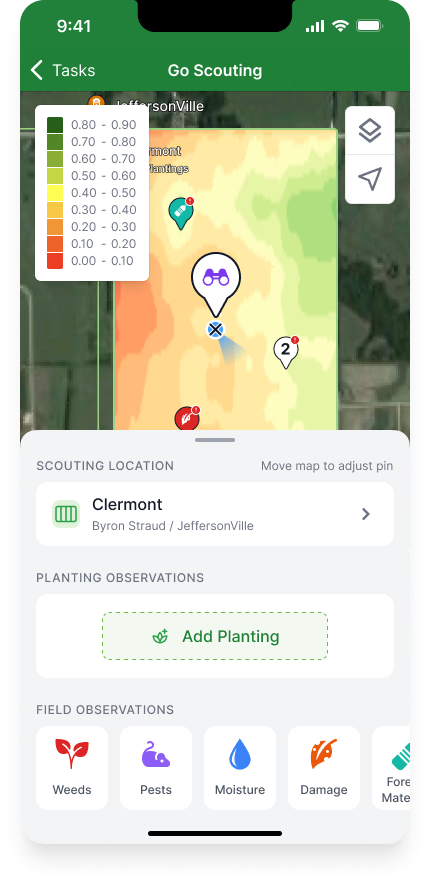
Go Scouting mobile screen showing map with field pins, scouting location, and planting observation options
Go Scouting: map-based field selection with planting and observation entry points
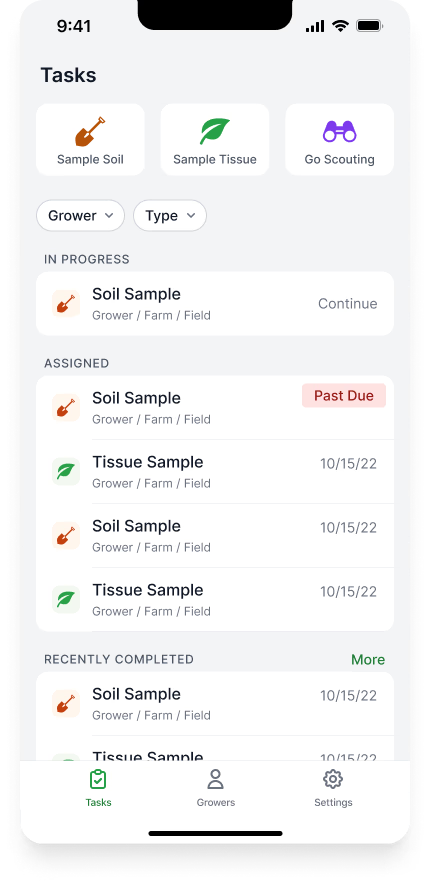
Tasks list showing soil samples and tissue samples organized by status: in progress, assigned, and recently completed
Task management: soil and tissue samples organized by status with due date tracking
Simplot mobile application screens showing map interface, field data layers, and scouting views
Mobile application: map-first interaction model with toggleable data layers, field selection, and scouting workflows

Map as primary interface

The central design insight was that maps function as primary interfaces, not backgrounds. The map wasn't a visual element that happened to show location data. It was the core interaction surface. Everything users needed to do started from the map: selecting fields, viewing spatial relationships, toggling data layers, and drilling into crop-level detail.

Navigation functions as interconnected components displaying comprehensive farm data: field selection, spatial relationships, crop types, and farm associations. The map contains multiple layers including PLSS data, terrain, and satellite overlays. Custom icons were created for all event instances across crop and pest types.
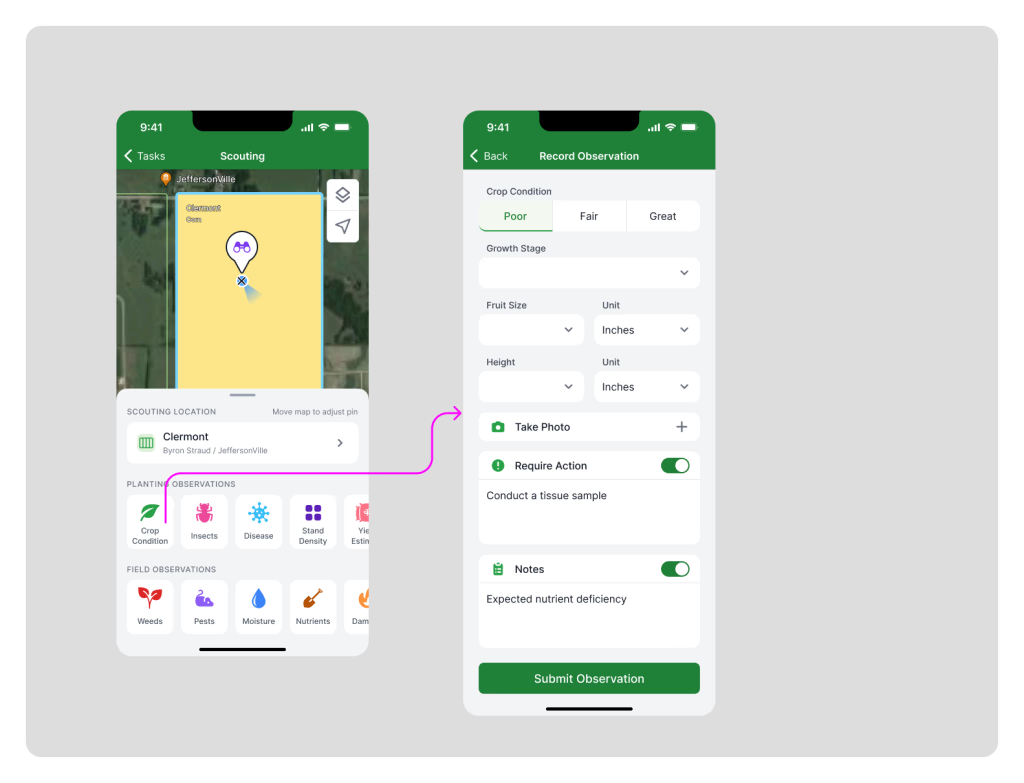
Two mobile screens: scouting map with field pins and observation icons, and record observation form with crop condition fields
Mobile scouting: map-based field selection flows into structured observation recording with crop condition, growth stage, and photo capture
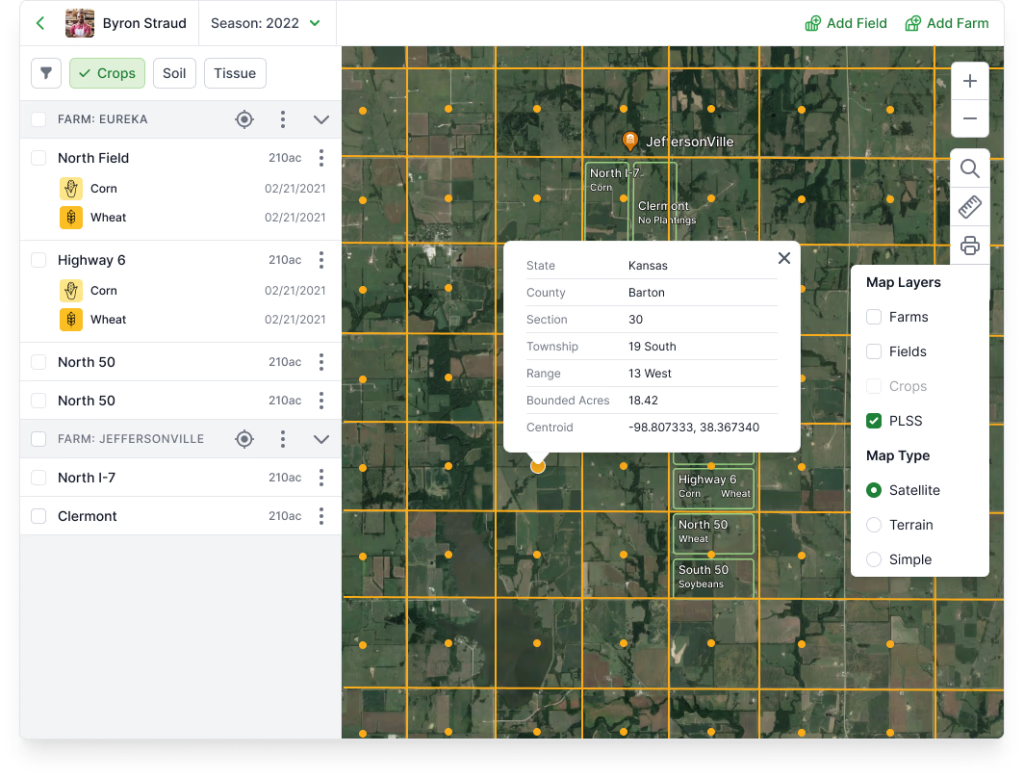
Desktop dashboard showing satellite map view with field boundaries, map layers panel, and data overlays
Desktop map dashboard: satellite imagery with toggleable layers for field boundaries, crop types, and scouting data

From Tailwind to proprietary system

The design system evolved from Tailwind into a proprietary system purpose-built for the agricultural domain. Green and grey accents maintain simplicity, cleanliness, and accessibility across complex components. The library was continuously expanding, driven by collective foundational pieces that ensured consistency as new features shipped.

Every component was designed to work in field conditions: high contrast for outdoor visibility, large touch targets for gloved hands, and clear state indicators that could be read at a glance. The system documented not just visual specs but interaction patterns, ensuring engineering could build consistent behavior across the entire product.
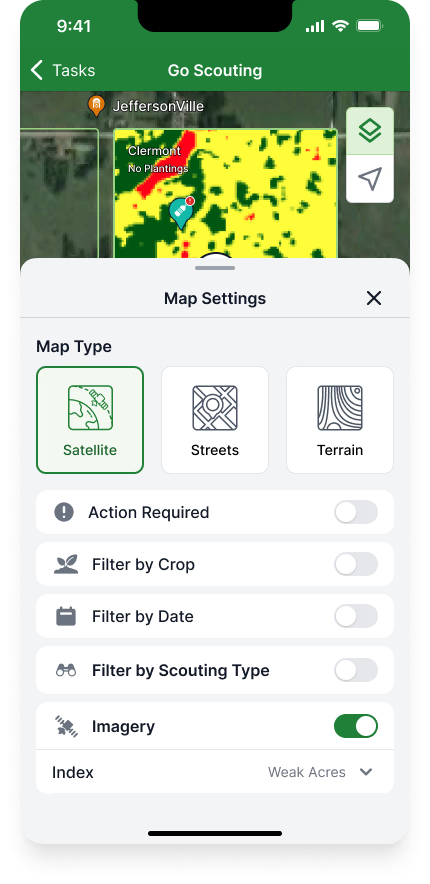

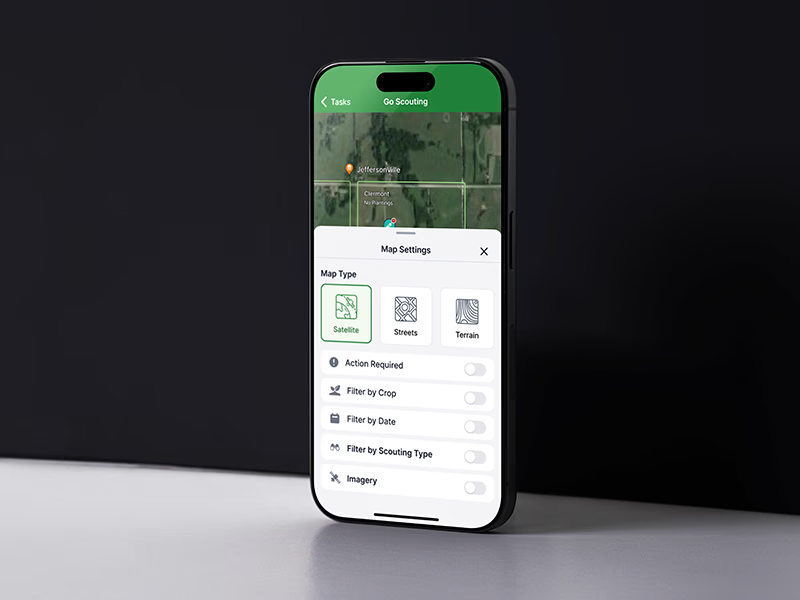
Map settings panel showing map type toggles for satellite, streets, and terrain, plus filter options for crop, date, scouting type, and imagery
Map settings: type selection, filtering by crop, date, scouting type, and imagery index controls
Custom map pin icon set showing 14 colored observation type markers for crops, pests, weather, irrigation, and field conditions
Custom icon system: 14 observation type markers with distinct colors and symbols for rapid field identification

Designed for the field

The product was designed for field conditions with minimal or no connectivity. This wasn't a nice-to-have feature. It was a core requirement that shaped every design decision. UI elements were exportable as PDFs or images for sharing with stakeholders who might not have app access. Local data download and storage functionality ensured operators could continue working regardless of signal strength.

The mobile scouting feature supported 14 observation types plus a null state, each with custom illustrations and icons. The rapid 48-hour discovery-to-implementation cycle meant we could respond to field conditions as they evolved, shipping new observation types as crop seasons demanded them.

Offline-first
Designed for zero connectivity
PDF/Image
Exportable UI elements
Local storage
Data download capability

Key insights

  • Progressive disclosure is critical for data-heavy products. It prevents cognitive overload while maintaining full capability. Users see what they need, when they need it, with the ability to drill deeper on demand.
  • Maps function as primary interfaces, not backgrounds. In agricultural products, the map is the workspace. Every interaction starts from spatial context, and the UI needs to respect that hierarchy.
  • Mobile constraints force clarity about user priorities. When you have 6 inches of screen real estate, you can't hide behind information density. You have to make hard decisions about what matters most.
  • Systems thinking enables scalable design without technical debt. A well-structured component library and consistent interaction patterns meant new features could ship without redesigning existing ones.

Desktop workflows, now in the field

The mobile-first redesign moved critical agricultural workflows out of the office and into the field where decisions actually happen. Agronomists and field scouts could record observations, review scouting data, and manage tasks without returning to a desktop. Offline-first architecture meant connectivity was no longer a prerequisite for productivity.

The map-as-primary-interface approach fundamentally changed how users interacted with farm data. Instead of navigating through menus and tables, every interaction started from spatial context. The proprietary design system evolved from Tailwind into a domain-specific library that shipped new features consistently as crop seasons demanded them, with the 48-hour sprint cadence keeping pace with field conditions.

14
Observation types supported
48hr
Discovery to implementation
Offline-first
Zero connectivity required
Map-native
Primary interaction model
Next project
Tubi